Docking in Nomosis: from a results archive to the pose you trust
How Nomosis reads the results of a docking campaign and takes you from a ranking to a pose you can defend: scores in context, binding modes, contacts and a consensus pharmacophore.
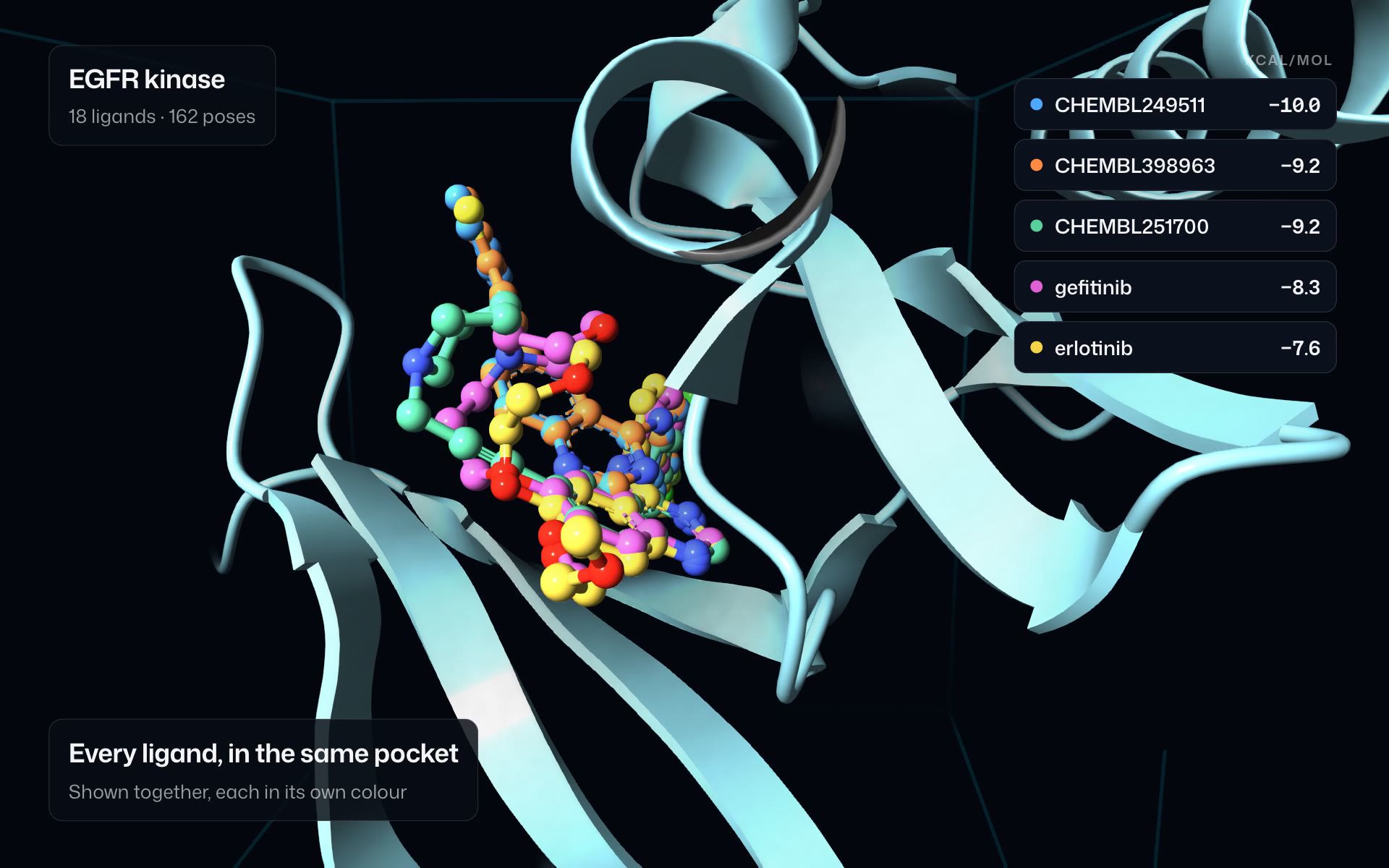
A docking campaign ends with a folder. Inside it there is a receptor, a few hundred poses and a ranking, and the work that matters has not started yet: deciding which of those poses you believe, and being able to say why to the rest of the team.
Most of that work happens between tools. The scores are in one window, the structures in another, the contacts in a script someone wrote two years ago, and the conclusions in a slide. Nomosis puts the whole study in one place, in the browser, with the receptor always in view. This article goes through what that looks like, on one of the public examples: a series of inhibitors docked into the EGFR kinase.
Bring the results, not the calculation
Nomosis does not dock. The calculation stays in the program you already trust, with the parameters you already validated. What Nomosis takes is its output: one ZIP with the receptor, the poses and their ranking files. Poses can be PDBQT, MOL2 or SDF.
When the archive is dropped on the workspace, Nomosis finds the receptor, gathers the poses by ligand and orders the ligands by their best score. An import summary says what it found: how many ranked poses have coordinates, how many are missing, and what was ambiguous. In the EGFR example all 162 ranked poses were matched to their coordinates, and nothing was ambiguous. When something does not match, you learn it at the door, not three slides later.
The study is saved with your project, and opens again whenever you need it.
Every ligand and every pose in the same frame
The left of the screen is a list of ligands, each on a card with its number of poses and its best score. Type a name to find one. Click a ligand and all its poses are overlaid in the pocket; click a pose and you see it alone. Hold ⌘ or Ctrl and click to build your own overlay, one pose at a time.
What does not move is the receptor. The pocket and the search site, drawn as the box or sphere the search covered, stay where they are while ligands come and go, so two poses are always compared in the same frame and from the same point of view.
Scores, and what they do not say
A ranking is a list of numbers, and numbers invite more confidence than they deserve. Open the analysis of a ligand and the first tab puts its scores in context: the best, the mean and the spread, a table you can sort, the distribution, and the drop from rank to rank.
That last plot is worth a look before anything else. For the best ligand of the example the nine poses fall from −9.97 to −8.92 kcal/mol, a little over one unit from first to last. A drop this small means the program found several placements it could barely tell apart. The top pose is then a candidate, not an answer.
Score of each pose of CHEMBL249511, by rank
kcal/mol
EGFR series example. Rank along the bottom; lower is better.
View the data
| Score | |
|---|---|
| 1 | −9.97 kcal/mol |
| 2 | −9.84 kcal/mol |
| 3 | −9.57 kcal/mol |
| 4 | −9.57 kcal/mol |
| 5 | −9.5 kcal/mol |
| 6 | −9.38 kcal/mol |
| 7 | −9.3 kcal/mol |
| 8 | −9.03 kcal/mol |
| 9 | −8.92 kcal/mol |
Nomosis shows the scores your docking program wrote. It does not turn a score into an affinity.
Nine poses. How many binding modes?
Nine poses are rarely nine different ideas. Often they are two or three ways of sitting in the pocket, each found several times. The second tab groups the poses of a ligand by how alike they are: heavy atoms are compared in the frame of the receptor, and the symmetry of the ligand is taken into account, so a flipped phenyl ring is not counted as a different pose.
The result is a dendrogram with a cutoff you can drag. Move it and the clusters and their sizes follow. Then ask for one pose for each mode: only the representative of each cluster stays on screen, and the comparison is between binding modes that are really different.
What each pose holds on to
Two poses with the same score can be held by different residues. Nomosis finds the contacts of every pose with the receptor and lays them side by side as an interaction fingerprint: a row for each residue and kind of contact, a column for each pose. Sort it by what the poses share, or by what sets them apart.
Pick two poses and the comparison is explicit: the contacts only the first makes, the ones only the second makes, and the ones they have in common. A 2D diagram draws the ligand flat with its partners and follows the pose on screen, and in 3D the same contacts are dashed lines to the residues they reach, with their distances when you want them.
This is usually where a decision is made. A pose that keeps the hinge contact the series is known for is a different proposition from one that scores the same and has lost it.
The features the poses agree on
From the poses of a ligand Nomosis derives a consensus pharmacophore: the chemical features that recur, where they sit, and how many poses support them. Donors, acceptors, hydrophobic groups, aromatic rings and charges each come with their support and their spread. Hide a kind of feature, find one in 3D with a click, or read the table of poses against features to see which pose satisfies which.
It is to be read for what it is. Recurrence describes these poses: a feature that most of them share is a feature the docking keeps finding. It is not a measure of affinity, and the analysis says so on screen.
Four questions, four places to look
The question | Where it is answered | What you get |
|---|---|---|
Did everything arrive? | Import summary | Ranked poses matched to coordinates; what is missing or ambiguous |
Is the top pose clearly the best? | Scores | Best, mean and spread; the drop from rank to rank |
How many ways does it bind? | Binding modes | Clusters by RMSD, with a cutoff you move; one pose for each mode |
What holds each pose? | Contacts | A fingerprint across poses; two poses compared; 2D and 3D |
What do the poses agree on? | Pharmacophore | Consensus features with their support, pose by pose |
Try it on the public examples
The public examples hold three docking studies with their analyses ready: the EGFR series used here, a screen and a set of fragments. They open in the browser with no account and nothing to install. If you would rather see it on your own results, with your team in the same view, ask us for a demo.